What is an STL file?
STL originally came from stereolithography and was first documented by 3D Systems in 1988. Today, it is still commonly treated as a de facto standard for 3D printing workflows because of its simplicity and broad compatibility.
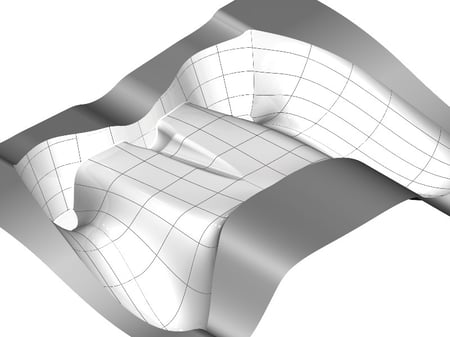
An STL file represents only the surface geometry of a 3D object. Instead of storing exact CAD entities such as analytic faces, NURBS surfaces, features, or parametric history, it approximates the object with a triangular mesh.
How does it work?
Each triangular facet stores the coordinates of its three vertices plus a normal vector that points outward from the surface. The vertex order follows the right-hand rule, which helps define the outside of the model consistently.
Because STL is a tessellated format, model quality depends heavily on the mesh resolution used during export. Coarse tessellation can produce visibly faceted surfaces, while very fine tessellation improves shape fidelity but increases file size and processing cost. This is one reason STL works well for manufacturing preparation and printing, but is less suitable than exact CAD formats for design editing.
ASCII vs. binary STL
STL has two main variants: ASCII STL and binary STL. Both store the same core geometric information, but binary STL is more compact and is more common in practice, while ASCII STL is easier for humans to inspect directly.
What STL does not store well
STL does not store colors, textures, scene structure, or animation, and it generally describes only a single object rather than a full scene. Some non-standard extensions for color data exist, but they are not widely supported. That simplicity is part of why STL remains popular, but it also explains why richer formats such as OBJ or 3MF are often preferred when appearance or metadata matters.
Applications and industry use cases
STL is most strongly associated with 3D printing, additive manufacturing, and rapid prototyping. In these workflows, a mesh representation is often enough because the downstream system mainly needs a printable surface description rather than full CAD feature intelligence.
It is also used as an interchange format for scanned meshes, concept models, and manufacturing preparation workflows. For simple parts, STL can serve as an intermediate format between design and fabrication, or as an output format for tools that generate polygonal representations from precise CAD geometry.
For software developers, STL matters when building applications for mesh import, model repair, print preparation, or conversion between mesh and CAD-oriented environments — a print-preparation tool that slices STL files into layers, for instance, or a scan-data pipeline that needs to clean up and re-export meshes.
Challenges or common pitfalls
A common mistake is to treat STL as if it were a full engineering model. It is not. STL captures a tessellated outer surface, so it does not preserve the same semantic richness as a native CAD model with exact geometry, topology, features, or product metadata.
Another frequent issue is poor mesh quality. Spatial's STL repair guidance lists problems such as misaligned edges, holes, floating parts, overlaps, double faces, and open edges. These defects can break downstream workflows or lead to manufacturing errors if they are not repaired before reuse.
Conversion can also introduce errors. Moving from a STEP or native CAD file to STL means discarding exact geometry in favor of an approximation, and a poor-quality translation can compromise design intent or create delays downstream. The healing process during interoperability exists specifically to catch and fix these problems.
Finally, STL's simplicity can become a limitation when teams need more than raw geometry. If a workflow depends on appearance data, assembly context, or richer metadata, STL may be too limited even if it is easy to exchange.
👉 Read also: How to Repair STL Files
How Spatial helps
We offer two SDKs that are directly relevant to STL workflows: 3D InterOp and CGM Polyhedra. They solve different but related problems.
3D InterOp handles the translation side. It reads and writes all major CAD and exchange formats, so developers can build applications that convert between native CAD files (CATIA, SolidWorks, NX, STEP, IGES, etc.) and STL. During translation, 3D InterOp applies automatic geometry and topology healing, which means much of the cleanup that would otherwise happen manually is handled at import time. It integrates natively with the 3D ACIS Modeler, CGM Modeler, and Parasolid, so the translated geometry is ready for downstream modeling operations without additional conversion steps.
For a concrete example: Renishaw, a manufacturer of industrial metal 3D printers, integrated 3D InterOp and the 3D ACIS Modeler into their QuantAM build-preparation software. The goal was to move away from an STL-only import pipeline and instead bring in native CAD data directly, which reduced transcription errors and largely eliminated the time their users spent healing STL files before printing. As Stephen Anderson, Renishaw's Director of Group Software, put it: "Our collaboration with Spatial now allows us to not only perform high-quality healing on STL files but, more importantly, to import various CAD formats directly."
CGM Polyhedra handles the mesh-level work. Where 3D InterOp gets the data in, CGM Polyhedra gives developers APIs to check, heal, and modify the polyhedral geometry itself. It covers holes, stitches facet edges, corrects facet orientations, removes degenerate and sliver triangles, and can reconstruct new watertight surface meshes from damaged inputs. Beyond repair, it also supports modeling operations on mesh data: Booleans, offsets, decimation, slicing, and clash detection. For additive manufacturing workflows specifically, CGM Polyhedra provides operations like hollowing, support generation, nesting, and wall thickness analysis.
The two SDKs are designed to work together. A typical additive manufacturing pipeline might look like this: 3D InterOp imports the CAD file and heals the B-rep geometry, CGM Polyhedra then operates on the tessellated representation for print preparation, and HOOPS Visualize (our visualization SDK) displays the results in the application.
For developers building 3D printing software, scan-data processing tools, or any application where STL files need to be read, repaired, and reused, these SDKs handle the geometry infrastructure so the development team can focus on domain-specific features instead.

-1.webp)

















.png?width=450&name=AdobeStock_188705270%20(2).png)